
iPhone · iPad · Android

Your cameras, explained in plain English.

The Woodcock AI app puts every camera in your pocket. Watch live, scroll a timeline of events that each come with a written AI description, set what each camera should look for, and get alerted the way you choose.

  • Free installation and set-up
  • First month free
  • No contract
Explore the app

Tap through the real thing.

These are real screens from the Woodcock AI app, from live sites. Pick a feature to see it on the phone.
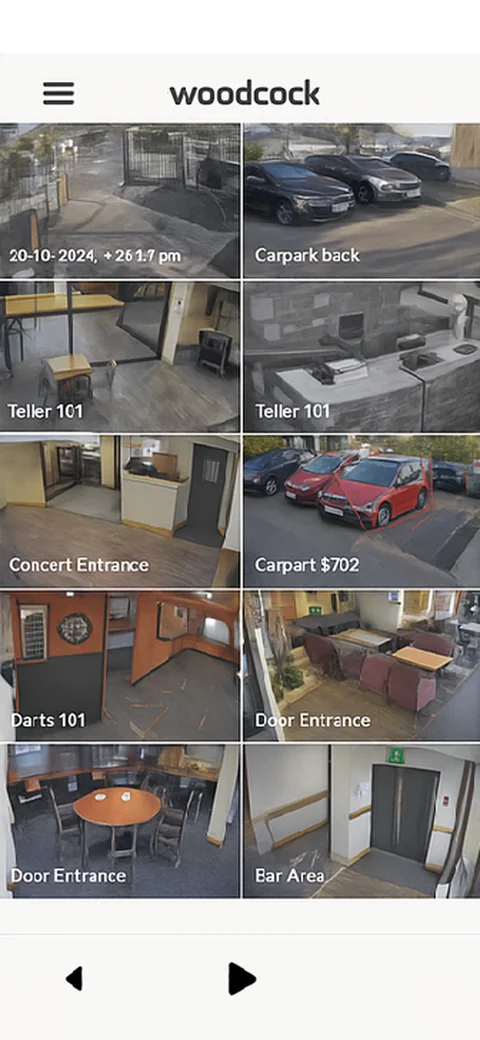
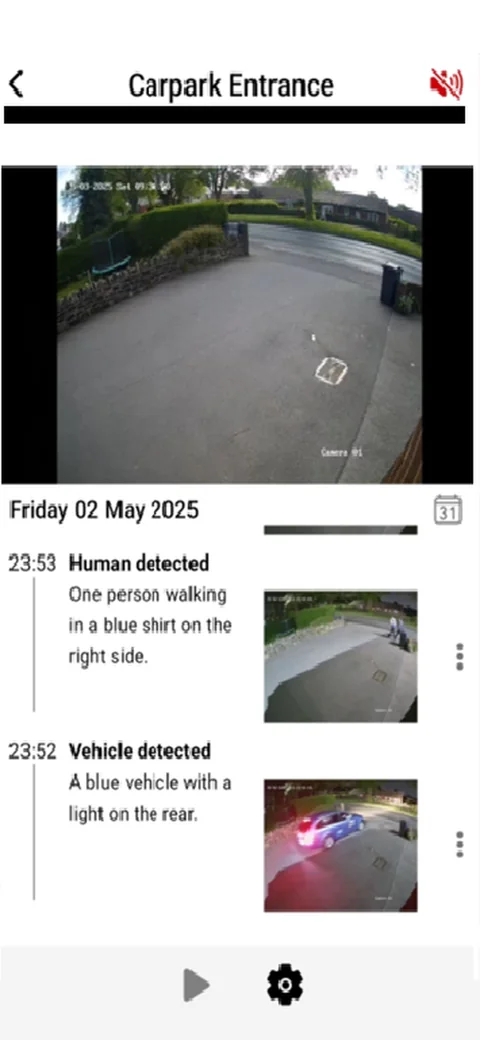
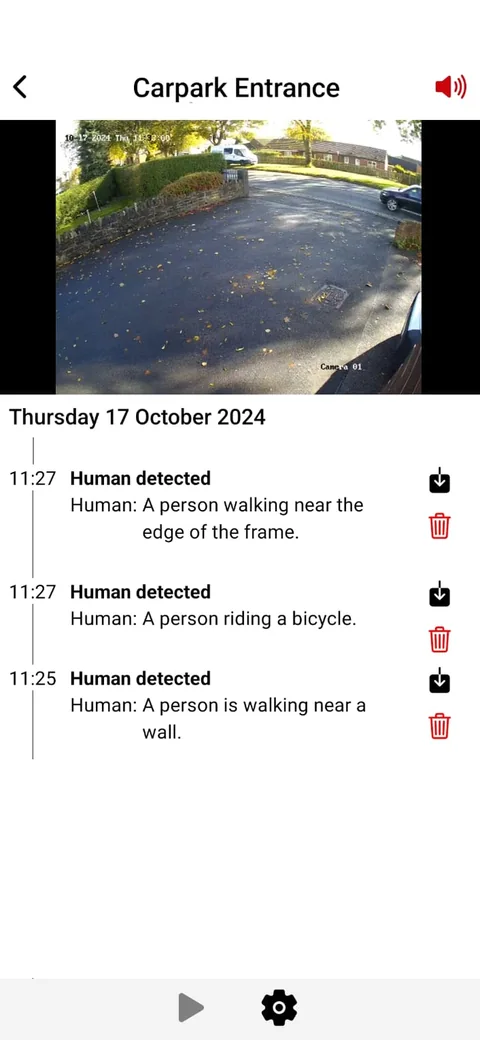
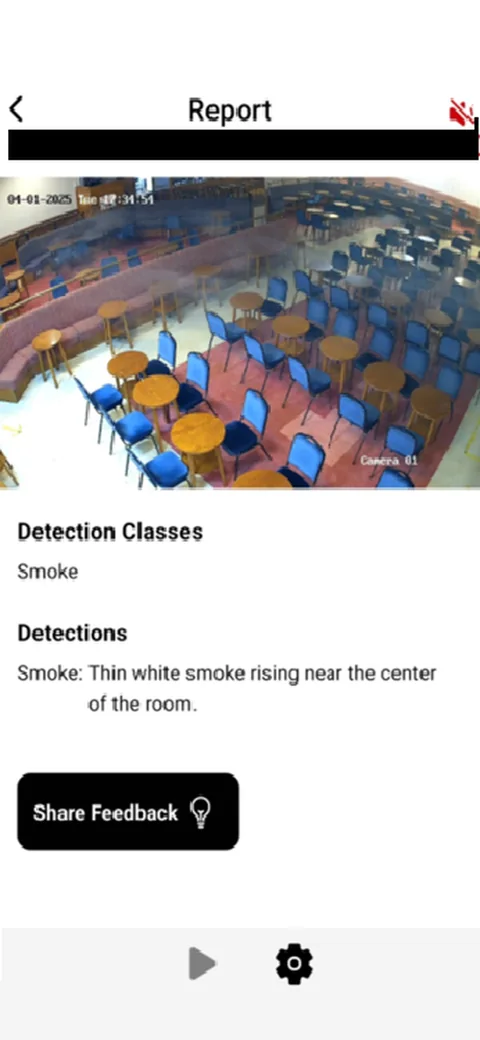
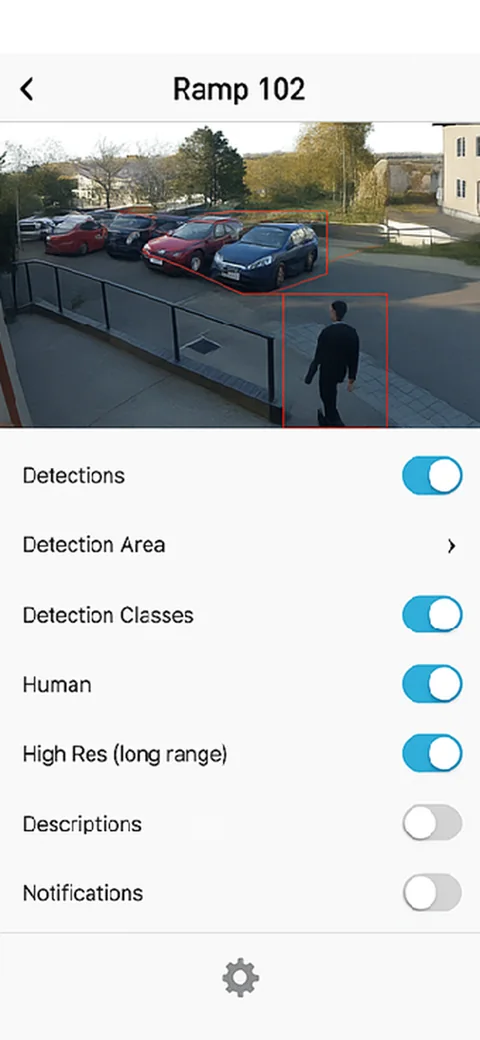
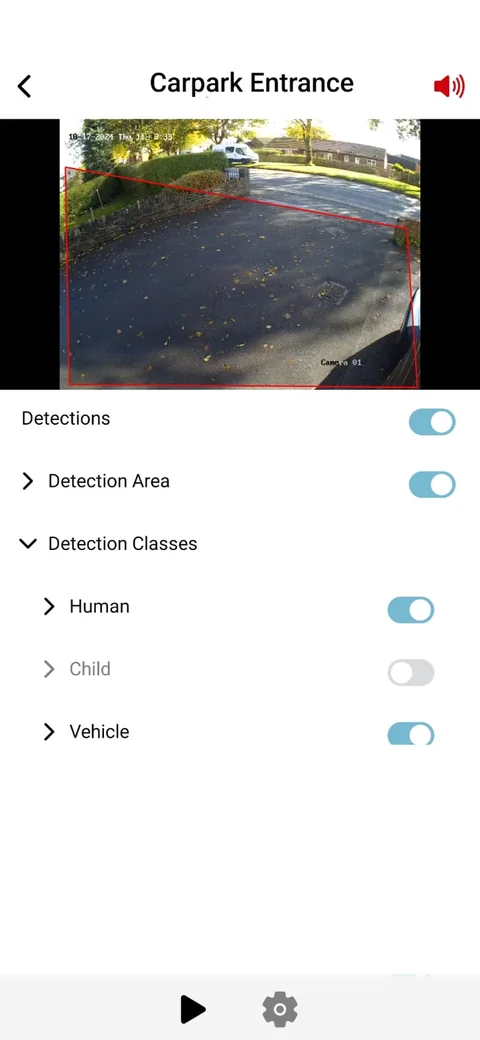
Camera grid in the Woodcock AI app showing tiles such as Carpark back, Teller 101, Door Entrance and Bar Area Carpark Entrance live view with a timeline: Human detected, one person walking in a blue shirt; Vehicle detected, a blue vehicle with a light on the rear Android event feed for Carpark Entrance with snapshots, AI descriptions, and download and delete buttons Event report with detection class Smoke: thin white smoke rising near the center of the room, and a Share Feedback button Camera settings for Ramp 102 with toggles for Detections, Human, High Res long range, Descriptions and Notifications Android settings with a red detection area drawn over the car park and Human, Child and Vehicle detection classes
In motion

From alert to answer in a couple of taps.

1 · The alertA push notification says what happened and where. Tap it to land on the event.
2 · The cameraJump from the camera grid to live view and the day's timeline, then back.
3 · The whole appCameras, live view, events, reports, settings and detection areas.
How alerts reach you

Four ways to hear about it. You pick.

Alerts are tailored to you. Choose which detections matter on each camera, set a schedule for when you want to hear about them, and pick how the alert reaches you. Each alert comes with the clip.

  • Alert scheduling, so a busy car park at lunchtime doesn't ping you, but the same car park at 3am does
  • Detection classes and areas set per camera
  • Keep the app running to receive push alerts

Push notification

Straight to your phone or tablet, with what was detected and where.

Email

A record in your inbox for you or the whole team.

SMS

A text message, so you hear about it even when you are not in the app.

Phone call

For the alerts that can't wait, like smoke or fire out of hours.

Everything in the app

Built for the people who look after the site.

Unlimited multi-view

Live stream as many cameras as you have connected.

Continuous recording

Scrub back through recorded footage as well as events.

60-day cloud backup

With custom retention available if you need longer.

MP4 clip downloads

Save the exact clip you need for the police or your insurer.

Pinch to zoom, full audio

Get closer to the detail and hear what's happening.

Billing in the app

Manage your account and billing from the same app.

Coming soon

Ask the cameras what happened.

Alerts already come with a written description. Soon you'll be able to ask questions about what a camera saw in plain English, right in the app.

Example conversation · coming soon

Did any vehicles come into the yard after 6pm?

Woodcock AIYes, one. A white box van came in through the main gate at 18:42, parked by bay 2 and left at 18:57. Nobody else entered the yard.

For installers

Your brand on the app.

Woodcock AI partners can offer the app white-labelled, with their own name and logo, so customers see your brand on every alert.

Become a partner
Getting started

Up and running in three steps.

Installation and set-up are free, and we'll help you connect your cameras. Most IP cameras and recorders that support ONVIF or RTSP will work.

  1. 1

    Get the app

    Register for the Woodcock AI app on iPhone, iPad or Android.

  2. 2

    Sign up

    Create your account with your email and a password, then verify it from the link we email you.

  3. 3

    Add your cameras

    Go to Devices, then Add Camera, and connect over RTSP. You'll see a live preview once it's connected.

Need a hand? Read the full set-up guide or call 0114 299 1449. Support is open 24 hours, Monday to Sunday.

Get the app

Register for Woodcock AI.

Register for the app on your platform and we'll send you everything you need to get started. Sign-up comes with free installation, a full month free and no contract.

Already have an account? Set up or add users.

QR code that opens woodcock-ai.pages.dev/download on your phone

Scan with your phone camera to open this page on your phone.

App FAQ

Questions about the app.

Can't see your question? Our team is here 24 hours a day, every day.

Which devices does the app run on?
Woodcock AI has an app for Apple and Android phones and tablets.
Do I need new cameras?
Usually not. Woodcock AI works with most existing IP cameras and recorders that support ONVIF or RTSP, in resolutions from 360p to 8K. A free site assessment will confirm it for your site.
How will I get alerts?
By push notification, email, SMS or phone call, with the clip. You choose the detections that matter on each camera and set an alert schedule.
What does the AI description do?
Each event comes with a short written description of what the camera saw, for example “One person walking in a blue shirt on the right side.” You know what happened before you open the clip.
Can I choose what each camera looks for?
Yes. In each camera's settings you can draw a detection area and choose detection classes. These include people, vehicles (cars, motorcycles, bicycles, buses and trucks), animals and belongings such as backpacks, handbags and suitcases.
How long is footage kept?
Footage is backed up to the cloud for 60 days, with custom retention options. You can scrub back through continuous recordings and download event clips as MP4 files.
Can more than one person use the app?
Yes. You choose the number of app users when you create your account.
What does it cost to get started?
Installation and set-up are free, your first month is free and there's no contract.
Not sure your cameras will work?

Find out free, in two minutes.

Tell us about your site and the CCTV you already have. We'll check it's compatible and recommend what the app should watch for.

Get my free site assessment

Get the app